From Paper to Platform: How Baylor University Unified 9 Million Square Feet with ArcGIS Indoors
The Challenge: Scattered Floor Plans and Hidden Data
Baylor University is a private Christian university in Waco, Texas, with a large and diverse campus that supports academic, research, residential, and athletic facilities across millions of square feet. Managing this scale of space requires accurate, accessible, and well-governed facilities data.
Managing more than 9 million square feet of campus space is no small task. For years, Baylor University’s building records were scattered across PDFs, CAD files, paper archives, and even individual staff knowledge. In some cases, the only available reference was a printed floor plan posted on a wall, resulting in a patchwork of disconnected information that was difficult to share, update, or maintain. Without a unified, floor-aware GIS, Facilities teams faced familiar challenges:
- Inconsistent geometries and attributes across buildings and projects
- Limited access for non-CAD users
- Redundant workflows between Computer-Aided Facility Management (CAFM) systems and mapping tools
- Time-consuming, manual space reporting for Gross Square Feet (GSF), Net Assignable Square Feet (NASF), and purpose codes
Baylor had the data – it just needed a way to bring it all together.
The Approach: Building a Foundation for Indoor Mapping
ArcGIS Indoors enables organizations to build an indoor geographic information system (GIS), making indoor mapping, space planning, and navigation accessible to a broad range of users. Common use patterns include asset and space management, safety and security, and occupant and visitor experiences. ArcGIS Indoors is available through both ArcGIS Enterprise and ArcGIS Online.
In 2025, Dunaway earned the Indoor GIS Specialty certification from Esri – placing us among just 22 firms worldwide to receive this prestigious designation. Indoor GIS specialty partners are approved by Esri to provide indoor geographic information system (GIS)-related services, build solutions, and integrate indoor data into third-party systems.
Baylor adopted ArcGIS Online as its system of engagement, allowing indoor data to be shared through configurable web and mobile apps while supporting collaboration across departments.
1. Establishing a GIS Foundation
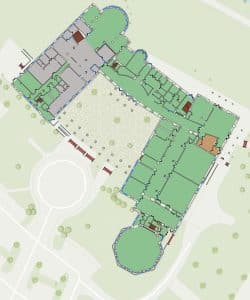
Baylor University adopted ArcGIS Online as its system of engagement, initially proving the value of GIS through campus-wide mapping efforts rather than jumping directly into indoor mapping. As part of this phase, Baylor – working with Dunaway – mapped the entire campus and developed a custom floor plan viewer using ArcGIS Web AppBuilder, making building and floor information accessible to non-CAD users across departments.
This campus-wide implementation demonstrated the operational value of floor-aware data and cross-department sharing, helping Baylor validate data standards, governance, and workflows before scaling a formal ArcGIS Indoors implementation.
2. Standardizing Source CAD for GIS
Over three years, two CAD technicians worked to normalize record drawings into a concise, GIS-ready schema—simplifying layers like walls, doors, stairs, and room areas. This became the “single source of truth” for building geometry and attributes, balancing technical accuracy with clarity for non-CAD audiences.
3. Migrating Floor Plans to ArcGIS Indoors
With standardized CAD data in place, Baylor’s GIS manager—supported by Dunaway—led the migration to ArcGIS Indoors. The team established Facilities, Levels, Units, and Details in an indoor geodatabase and published governed, floor-aware layers to support editing and analytics.
Resources and Timeline: Baylor invested three years in CAD standardization with two dedicated CAD technicians, followed by a seven-month ArcGIS Indoors implementation led by the university’s GIS manager in collaboration with Dunaway. Today, the indoor system is sustained through shared governance between GIS and CAD staff, with supplemental support as needed.
Baylor University’s indoor adoption marked a major shift, moving from static, batch-created data to a living, maintainable indoor system, updated alongside capital projects and renovations within a month of as-built submission.
4. Why Indoors Over a Traditional CAFM?
Several factors guided Baylor’s decision to adopt ArcGIS Indoors as the foundation for its indoor GIS.
Interoperability with the ArcGIS platform: ArcGIS Indoors extends the ArcGIS system by adding floor-aware context to familiar apps such as ArcGIS Experience Builder, ArcGIS Field Maps, and ArcGIS Survey123, allowing indoor data to be used seamlessly across mapping, data collection, and visualization workflows.
Cost efficiency through platform alignment: By building on existing ArcGIS investments, Baylor was able to support indoor mapping and space management without introducing an additional, standalone facilities management system.
Data stewardship and flexibility: The university maintains full control of its floor plans and attributes, enabling governance, long-term maintenance, and adaptability while avoiding rigid data models and vendor lock-in.
The Results: From Floor Plans to Actionable Insights
Operational Impact: Floor-Aware Facilities Management
With ArcGIS Indoors, Baylor’s Facilities team now works from a centralized, floor-aware view of campus buildings, replacing fragmented floor plans and static documents. Indoor data supports day-to-day facilities operations by providing consistent access to building layouts, room attributes, and space classifications across departments.
This foundation enables Facilities and planning teams to understand how space is used, prioritize maintenance and improvement efforts, and coordinate work across buildings and floors. By working from a shared indoor system, teams can make operational decisions with greater confidence and reduce time spent reconciling data from multiple sources.
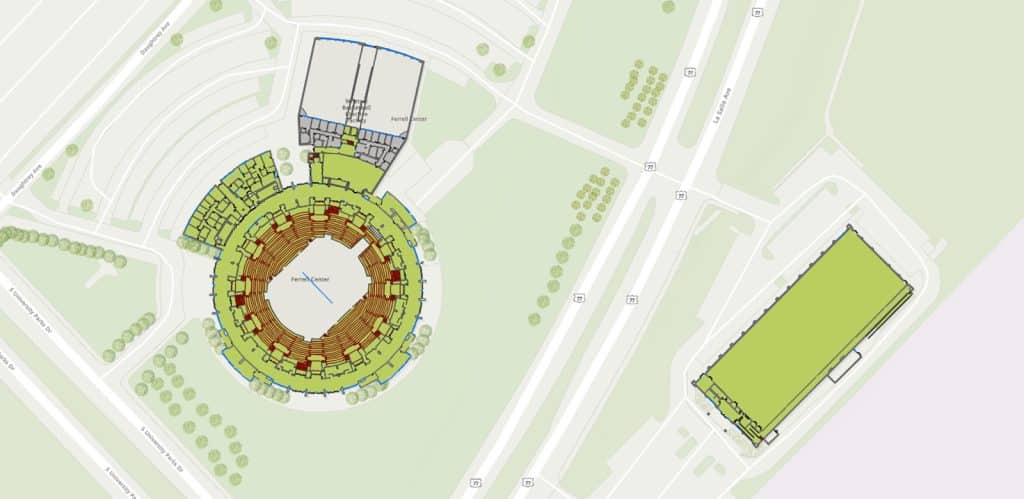
For example, Facilities teams use floor-aware indoor data to:
- Identify and prioritize maintenance activities based on space type, usage, and location within a building
- Coordinate work across floors and buildings using consistent room and space attributes
- Support space planning and allocation decisions with accurate GSF/NASF and room classifications
This floor-aware approach helps Facilities teams plan work more efficiently and make operational decisions using a shared, trusted view of indoor space.
Compliance and Reporting: Real-Time Space Analysis
The provides real-time insights for finance, research, and planning stakeholders. With dynamic filters and consistent calculations, it’s become the trusted source for space management data.
The dashboard offers:
- GSF, NASF, unit counts, and purpose-code designations
- Filters by space, department, and room type
- Consistent, validated methods for calculating GSF (level-aware) and NASF (unit-based)
This has streamlined space allocation reviews and improved confidence in every report.
Engagement by Design: The Right App for the Right Audience
Baylor has designed ArcGIS Experience Builder apps tailored to specific user groups, ensuring each audience sees only what they need, nothing more, nothing less.
Curated ArcGIS Online home pages highlight featured content for each audience, improving discoverability and encouraging repeat use. Floor-aware editing and governance enable Facilities, Space Management, and project delivery teams to work from a shared indoor system, supporting coordination from planning and design through construction and ongoing operations.
Lessons Learned
- Treat CAD as governed source data. Standardize a minimal, GIS-ready schema for Indoors while preserving the richer record set for archival fidelity.
- Prototype before scaling. Start small with one or two buildings to validate standards, workflows, and governance.
- Resource realistically. Baylor’s indoor GIS effort included several years of CAD standardization led by two CAD technicians, followed by a focused ArcGIS Indoors implementation managed by the GIS team with Dunaway’s support. Long-term success also required planning for ongoing governance and maintenance.
- Make it floor-aware. Floor-aware data is foundational to accurate indoor mapping, analysis, and reporting, and allows indoor GIS to integrate seamlessly with the broader ArcGIS platform and configurable apps such as ArcGIS Experience Builder.
- Close the loop with analytics. Pair Indoors data with dashboards to turn mapped spaces into measurable insights.
What’s Next?
With its indoor GIS capabilities established, Baylor is building on this foundation to further support planning, operations, and decision-making across campus. The university is expanding how indoor data is used for analysis and reporting, while exploring ways to connect indoor space information with broader facilities management and capital planning workflows. The focus remains on maintaining accurate, governed indoor data that can evolve as campus needs change.
About the Author